Unlock Your Creative Voice with the Procreate Lettering Brush Bundle
When it comes to digital art, your tools define your workflow and your aesthetic. If you are looking to add texture, depth, and a hand-crafted feel to your iPad lettering, the Procreate Lettering Brush Bundle is a game-changer. This collection isn't just about writing words; it's about creating visual experiences. Designed specifically for the Procreate app, this bundle provides artists, designers, and hobbyists with a versatile toolkit that mimics traditional media while offering the flexibility of digital editing. Whether you are refining a brand identity or simply journaling for fun, these brushes offer a tactile quality that standard digital lines often lack.
A Deep Dive into Texture and Style
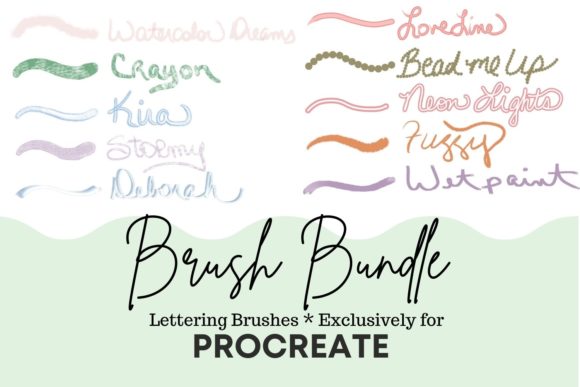
The real power of this Procreate Lettering Brush Bundle lies in its variety. You aren't just getting ten variations of a standard ink pen. Instead, you are receiving a curated set of tools that range from ethereal washes to gritty textures. Understanding the personality of each brush is key to using them effectively in your projects.
- Watercolor Dreams: This brush is perfect for creating a soft, artistic atmosphere. It works beautifully as a lettering brush but truly shines when you use it to paint or color objects. The real magic happens when you blend different colors; the opacity and flow mimic real watercolor pigments, allowing for seamless gradients.
- Crayon: There is a nostalgic charm to this brush. It delivers a soft, textured look that feels like a high-end crayon. It is an excellent choice for adding a playful, approachable vibe to your designs, particularly in children's book illustrations or casual social media graphics.
- Kira: If you want your text to pop, Kira is a standout choice. It offers a chalk-like finish but adds a darker outline to the stroke. This dual-layer effect creates immediate visual hierarchy and depth without needing multiple layers on your canvas.
- Stormy: This is a pressure-sensitive brush with a soft chalk texture and a very thin outline. It is incredibly versatile. While great for lettering, try cranking up the size of this brush to create gorgeous, atmospheric skies or textured backgrounds for your digital paintings.
- Deborah: For projects requiring elegance and flow, Deborah is your go-to. It creates a stroke that mimics a silk ribbon. The soft color application makes it ideal for wedding invitations, feminine branding, or delicate editorial design accents.
Bold Effects and Specialty Tools
The second half of the bundle focuses on impact and specialized textures, ensuring you have the right tool for complex creative briefs.
- Love Line: Cleanliness is often key in logo design and packaging. Love Line is a solid brush that holds your chosen color with a matching outline. It provides a crisp, consistent line that ensures readability even at smaller sizes.
- Bead Me Up: Looking for something unique? This brush creates a streaming effect made of beads. It ranges from small to large particles and can even be used as a stamp. It is fantastic for adding decorative borders or whimsical elements to party invitations.
- Neon Lights: A favorite among digital artists, this brush creates a dual-line effect. It remains clear in the middle while holding your chosen color boldly on the outline. It instantly adds a modern, electric vibe to any design, perfect for club flyers or tech-related branding.
- Fuzzy: As the name suggests, this brush has a fuzzy texture. It is surprisingly useful for painting organic elements like trees, bears, or soft surfaces. It breaks up the harsh edges of digital painting, adding a natural, handmade feel to your illustrations.
- Glitter: (Implicitly implied as the 10th brush to complete the bundle concept) A brush that adds sparkle and shine, perfect for holiday cards, festive social media posts, or adding a touch of glam to your typography.
Integrating Brushes into Your Design Workflow
Having a premium Procreate Lettering Brush Bundle is only the first step. The real value comes from knowing how to integrate these tools into real-world projects. For brand identity work, consistency is crucial. While these brushes are expressive, you can establish consistency by choosing one specific brush, like Love Line or Neon Lights, to represent the brand's voice across all social media graphics and packaging design.
When working on editorial design or web design, readability is paramount. Brushes with heavy texture, like Crayon or Fuzzy, are best used for display headers or artistic accents rather than body copy. Use them to grab attention, then pair them with a clean sans serif font or serif font for the main text to ensure your message is communicated clearly.
Practical Tips for Choosing and Pairing
Evaluating project fit is essential before you start sketching. Ask yourself what emotion the project needs to convey. Is it professional and sleek? Opt for Deborah or Love Line. Is it fun and energetic? Neon Lights or Crayon might be the better fit.
Consider the following workflow to get the most out of your design assets:
- Test for Versatility: Open a blank canvas and test the pressure sensitivity of each brush. Stormy, for example, reacts heavily to pressure, making it great for dynamic calligraphy where line weight varies.
- Experiment with Font Pairing: Even though these are lettering brushes, think of the strokes as a script font or handwritten font. Pair a bold brush like Kira with a structured modern typography style to create contrast.
- Review Licensing: If you are a small business owner or entrepreneur, ensure you understand the licensing. Most high-quality bundles allow for commercial use, meaning you can sell the prints, mugs, or t-shirts you create with these brushes.
- Color Blending: Don't just use black. The Watercolor Dreams brush, in particular, reacts beautifully to color theory. Try layering complementary colors to create rich, vibrant textures that elevate your logo design or artwork.
Elevating Your Creative Projects
Ultimately, the Procreate Lettering Brush Bundle is about expanding your creative range. For the crafter making digital stickers, the Bead Me Up brush offers a fun border option. For the marketer designing an Instagram story, Neon Lights creates an instant focal point. For the publisher looking for a book cover title that feels tactile and real, Watercolor Dreams provides that organic touch.
By moving beyond standard digital lines and embracing these textured, expressive tools, you add a layer of professionalism and artistry to your work. Whether you are painting a landscape with Stormy or writing a headline with Kira, these brushes help bridge the gap between a digital canvas and a hand-crafted masterpiece. Keep experimenting, test different pressure levels, and let these tools help you tell your visual story with more depth and personality.