Procreate Fire Brush: Ignite Your Digital Art with Realistic Flames
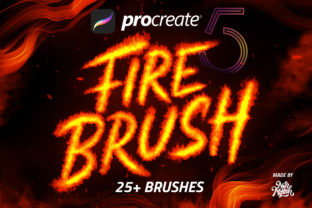
There’s a specific kind of energy that fire brings to a composition. It can be a symbol of passion, destruction, warmth, or raw power. Capturing that dynamic, flickering essence in a digital illustration, however, can be a challenge. Standard brushes often feel static, leaving you to manually build up layers and effects that still lack authentic movement. This is where a specialized tool like the Procreate Fire Brush set changes the game, offering a collection of over 25 brushes designed to bring immediate, vibrant heat to your canvas.
A Toolkit for Digital Pyrotechnics
This collection isn't a single, one-note effect. It’s a comprehensive toolkit for building complex, layered scenes of fire and heat. Understanding what each component brings to your workflow is key to using them effectively. The personality of this set is all about controlled chaos, giving you the power to create anything from a subtle ember to a raging inferno with intuitive brush strokes.
- Fire Brush: The cornerstone of the collection. This brush lays down the foundational flames, with a soft, organic shape that mimics real-world combustion. It’s perfect for creating the core body of a fire, allowing you to build volume and intensity with each pass. The edges have a natural, feathered quality that avoids looking overly digital or artificial.
- Lava Brush: Moving beyond open flame, the Lava Brush simulates molten, viscous heat. It’s ideal for creating glowing cracks in the ground, dripping magma effects, or the intense, slow-moving core of a magical element. The texture feels thick and heavy, adding a different dimension of fire-based effects to your digital painting.
- Smoke Brush: No fire is complete without smoke. This brush provides a soft, diffused, and airy effect that’s perfect for building atmospheric haze, wisps of smoke curling from an ember, or dense plumes rising from a source. It adds depth and realism, helping to ground your fire effects in a believable environment.
- Sparks Brush: For that final touch of kinetic energy, the Sparks Brush scatters tiny, bright embers and flying sparks. Use it to add a sense of action and movement, suggesting intense heat and volatility. It’s the detail that sells the effect, making a static image feel alive with a crackling, energetic presence.
Practical Applications: More Than Just Illustration
The versatility of the Procreate Fire Brush set extends far beyond traditional illustration. Its visual style is inherently dramatic and attention-grabbing, making it a valuable design asset for a wide range of creative professionals. Think about how this aesthetic can elevate your projects across different mediums.
For brand identity, a subtle use of the smoke or sparks brush could add a unique, gritty texture to a logo for a hot sauce company, a metal band, or a high-energy sports brand. In editorial design and packaging design, a fiery background created with these brushes can make a magazine cover or product label instantly stand out on a crowded shelf. It creates a strong visual hierarchy, drawing the viewer's eye directly to the focal point.
In the digital space, the applications are just as powerful. Use these brushes to create stunning social media graphics that stop the scroll. An animated post with flickering flames or a static image with a smoky, mysterious aura can dramatically increase engagement. They are also fantastic for photo editing, allowing you to add fantastical elements to portraits or create dramatic lighting effects in landscapes. Even for lettering, using the fire brush to form letters or as a background element can create a bold, impactful statement piece.
How to Work with Fire: A Practical Guide
Getting started with these brushes is straightforward, but a few practical tips can help you achieve more professional and realistic results. The design of these tools prioritizes an intuitive workflow, making them accessible whether you’re a seasoned pro or just starting your creative journey.
Setting the Stage: Color and Layering
The most critical step for realism is your color palette. Fire is not a single color. Start with a deep, saturated red or orange as your base. As you build up layers of light and heat, move towards a brighter orange and then a brilliant, almost white-yellow for the hottest points. This creates the illusion of intense heat and light. Always work on separate layers. Keep your base fire, smoke, and sparks on different layers so you can adjust their opacity, blend modes (try 'Screen' or 'Add'), and positioning independently without affecting the rest of your artwork.
Building Depth and Realism
Don't just use one brush. Combine them to create a complete scene. Start with the Smoke Brush to establish an atmospheric base. Then, use the Fire Brush to build the main body of the flames. Add the Lava Brush for glowing hotspots or ground effects. Finally, finish with the Sparks Brush on top to add that final layer of dynamic energy. By layering these elements, you move from a simple fire effect to a convincing and immersive scene.
Compatibility and Common Questions
This is a crucial point for any designer: these are native Procreate brushes. They are designed exclusively for the iOS app and are fully compatible with Procreate 5 and earlier versions. They do not work in Photoshop or other desktop applications. This specificity is a strength, as the brushes are optimized to take full advantage of Procreate’s powerful brush engine and Apple Pencil's pressure sensitivity. Because they are a premium font of sorts for your digital toolkit—a specialized typeface of effects—they offer a level of quality and responsiveness that generic, cross-platform tools often lack.
Ultimately, this collection is a powerful creative font that provides a specific, high-impact visual language. It’s a commercial font for your digital brush library, ready to help you build a stronger, more fiery brand identity