Sparkle Your Digital Art: Gemstone Procreate Brush Stamps
Every digital artist hits a point where a project needs that extra layer of polish. You’ve nailed the composition, the lighting is perfect, but the piece still feels like it’s missing a focal point. This is where high-quality design assets become invaluable, moving a project from good to unforgettable. Gemstone Procreate Brush Stamps are one such asset, offering a collection of intricate, ready-to-use elements that add instant luxury and detail to your work.
What Exactly Are These Gemstone Stamps?
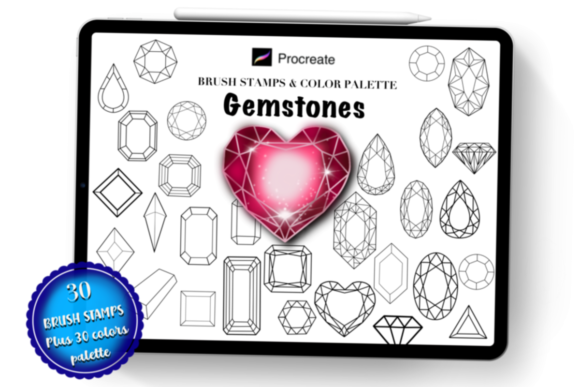
At their core, these are specialized Procreate brushes designed not for freehand drawing, but for stamping. The set includes 30 distinct gemstone designs—think brilliant-cut diamonds, raw crystals, polished gold bars, and ornate jewelry settings. Each stamp is a high-resolution brush that, when tapped onto your canvas, places a detailed, pre-drawn gemstone element. This isn't just a simple shape; it's an asset with built-in shading, highlights, and texture that mimics the real-world sparkle and depth of precious stones.
The visual personality of these stamps is one of elegance and versatility. They can read as hyper-realistic, perfect for a jewelry brand's logo design, or stylized for a fantasy-themed book cover. The included 30-color swatch file provides a curated palette, ranging from classic diamond whites and golds to vibrant crystal hues. This allows for immediate experimentation without the guesswork of creating your own metallic or gemstone gradients from scratch. The overall appeal lies in their ability to inject a sense of value and sophistication into any piece, functioning as a modern typography element for visual storytelling.
Practical Applications for Designers and Creators
The true value of a tool like Gemstone Procreate Brush Stamps is measured by how many projects it can enhance. Their utility spans a wide range of creative fields, acting as a bridge between illustration and graphic design.
- Brand Identity and Logo Design: For businesses in the beauty, luxury, or wedding industries, these stamps are a game-changer. They can be used to create custom monograms, accent a wordmark, or serve as the central element of a logo. A jeweler, for instance, could use a diamond stamp to create a memorable icon that communicates quality and craftsmanship instantly.
- Editorial and Publishing Design: Magazine layouts, book covers, and social media graphics benefit enormously from decorative elements. Use a cluster of crystal stamps to frame a headline, or a single gold bar as a divider between sections. This approach adds visual hierarchy and directs the reader's eye without overwhelming the core content.
- Web and UI Design: In digital interfaces, subtle details make a significant difference. These stamps can be used to create unique favicon designs, section dividers on a website, or eye-catching icons for a pricing page that highlights a premium tier. The ability to scale and change opacity ensures they integrate seamlessly into any layout.
- Product Packaging and Marketing: Physical and digital products alike gain perceived value through thoughtful design. Use the stamps to create decorative borders for business cards, embellish product labels, or design luxurious-looking thank you cards. For entrepreneurs, this is a way to achieve a high-end look without a large design budget.
- Personal Projects and Crafting: Beyond commercial use, these stamps are perfect for creating personalized items. Design a custom tattoo flash sheet, decorate digital planners, create unique stationery, or add a special touch to scrapbooking layouts. The ease of use—just tap and stamp—makes them accessible even to hobbyists.
Integrating Stamps into Your Design Workflow
Using these assets effectively requires a bit of strategy. Simply placing a gemstone on a canvas isn't enough; it needs to feel integrated into the overall composition. Think of these stamps as a premium font for your illustrations—they provide a specific stylistic voice.
First, consider the context. A raw crystal stamp might suit a natural, earthy brand identity, while a polished diamond cut is better for a sleek, modern logo. The style should align with the project's personality. Second, pay attention to scale and placement. A single, large gemstone can serve as a powerful focal point, while a trail of smaller ones can create a sense of movement or luxury. Use Procreate's transform tools to resize and rotate stamps to fit naturally within your scene.
Color is another powerful lever. While the included swatch file offers a great starting point, don't be afraid to experiment. Change the color of a diamond stamp to a deep sapphire to match a brand's color scheme, or apply a gold stamp in a rose gold hue for a softer effect. Adjusting the opacity can also help; lowering it creates a subtle, watermark-like effect perfect for background textures.
Finally, think about font pairing in a broader visual sense. These decorative stamps work best when balanced with other design elements. Pair a bold, ornate gemstone stamp with a clean, sans-serif font for a balanced hierarchy. Use them to accent a script font in a wedding invitation design. The key is contrast—let the stamps add the sparkle while other elements provide clarity and readability.
Getting Started and Final Thoughts
The process is designed to be straightforward. After downloading the .brushset file, import it into Procreate. The stamps will appear in your brushes library, ready to use. Select a stamp, choose a color from the swatch file or your own palette, and tap your Apple Pencil or finger on the canvas. From there, you can scale, recolor, and reposition the element as needed.
For any creative professional, marketer, or hobbyist looking to add a touch of opulence and detail to their digital artwork, this set of Gemstone Procreate Brush Stamps is a practical and versatile addition to your toolkit. It solves the common problem of needing intricate decorative elements quickly, allowing you to focus more on the creative vision and less on the time-consuming task of drawing every detail from scratch. Whether for a commercial project or a personal passion, these stamps offer a simple way to make your work shine.