Procreate Watercolor Painting Brushes: Your Digital Studio
There’s a certain magic to watercolor. The way pigment bleeds into wet paper, the soft, unpredictable edges, the beautiful accidents that make each piece unique. For digital artists, capturing that organic, fluid feel has often been a challenge. Standard digital brushes can feel too precise, too controlled. That’s where specialized tools like the Procreate Watercolor Painting Brushes come in. They’re not just another set of tools; they’re a bridge to that authentic watercolor experience, right on your iPad.
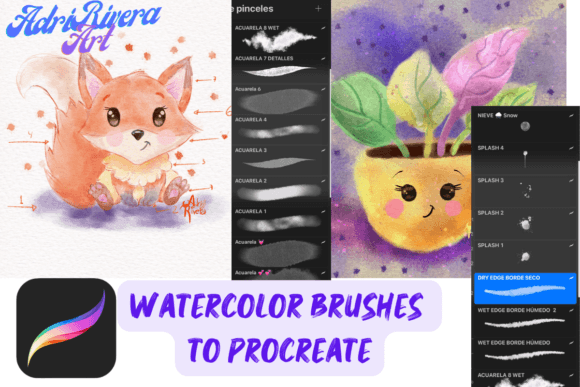
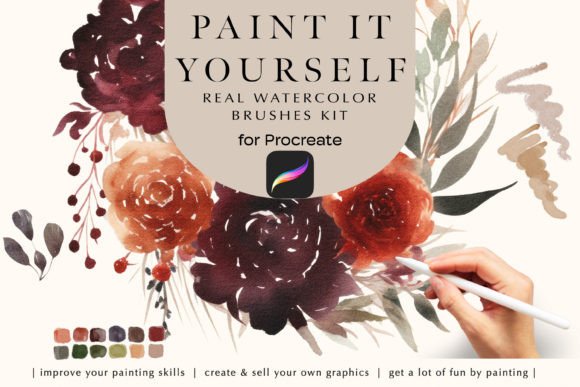
This set is designed to work seamlessly with the Procreate app and an Apple Pencil, offering a tangible connection to the digital canvas. The core of the package is five distinct watercolor brushes, each engineered to mimic different aspects of traditional watercolor. You get a versatile range, from a brush that lays down a broad, washy wash to another that creates fine, granular details. The included high-resolution watercolor paper texture, at 4000x3000 pixels and 300 DPI, is a game-changer. It provides the perfect surface for the digital pigment to interact with, creating subtle variations in texture and absorption that make your strokes feel alive. A complementary color palette is also included, offering a curated selection of hues that work beautifully together, helping you maintain color harmony in your work.
Where Digital Watercolor Truly Shines
The appeal of these Procreate Watercolor Painting Brushes extends far beyond personal sketching. For designers and brand strategists, they offer a way to inject warmth, authenticity, and a hand-crafted feel into projects that might otherwise feel sterile. Imagine a logo for an artisan bakery or a boutique hotel, rendered with these brushes. The soft edges and organic textures instantly communicate craftsmanship and care, building a brand identity that feels approachable and genuine. This style of display font work, when done with watercolor, moves beyond mere typography into a form of visual storytelling.
In editorial design and packaging design, the applications are equally powerful. A book cover for a novel, a menu for a farm-to-table restaurant, or the label for a small-batch jam can be transformed. The brushes allow you to create illustrations, borders, or background textures that add a layer of depth and personality. For social media graphics, this style cuts through the noise. A watercolor-washed quote graphic or a product image with a painted background has a distinct, thumb-stopping quality that polished vector graphics often lack. It signals a human touch, which is invaluable for content creators, bloggers, and small business owners looking to build a loyal community.
Practical Guidance for Your Creative Projects
Adopting a new set of brushes is about more than just downloading files; it’s about integrating them into your workflow. Before diving into a client project, take time to experiment. Load the brushes and the paper texture. Play with the Apple Pencil’s pressure and tilt sensitivity. Notice how each brush responds differently. One might be perfect for loose, expressive backgrounds, while another excels at detailed line work or adding subtle shadows. This testing phase is crucial for understanding the visual hierarchy you can create.
Consider how these brushes will influence readability and brand perception. Watercolor text, while beautiful, can sometimes be challenging to read at small sizes. It’s often best used for headlines, logos, or short, impactful phrases rather than long paragraphs of body copy. Pairing a watercolor element with a clean, sans serif font for supporting text is a classic and effective strategy. This creates a balanced font pairing where the handcrafted style draws the eye, and the clean type ensures the message is clear. The goal is to use the style to enhance your message, not obscure it.
From a technical standpoint, remember the requirements: a compatible iPad, Apple Pencil, and the Procreate app (version 5 or higher). The files are native to Procreate, ensuring smooth performance. When thinking about commercial use, these brushes are design assets you own. You can use the artwork you create with them for personal and commercial projects, from client work to products for sale. This makes them a practical investment for freelancers and agencies alike.
Ultimately, tools like the Procreate Watercolor Painting Brushes are about expanding your creative vocabulary. They provide a pathway to a specific aesthetic that resonates with audiences seeking authenticity. Whether you’re designing a full brand identity, creating marketing materials, or simply exploring a new artistic style, they offer a focused, high-quality solution. The real value lies in how they help you communicate a feeling—of tradition, of artistry, of care—through your digital work. It’s about bringing the soul of watercolor into the modern design landscape.