Elevate Your Digital Art with 45 Pencil Brushes for Procreate
There’s a certain magic in the scratch of a real pencil on paper—the way the lead catches the tooth of the sheet, the subtle grain it leaves behind, the imperfect, human line that feels alive. For digital artists using Procreate, replicating that authentic, tactile experience can be the difference between a sterile digital drawing and one with genuine soul. That’s precisely where the 45 Pencil Brushes for Procreate pack steps in, offering a meticulously crafted toolkit designed to bridge the gap between your iPad and the timeless art of pencil sketching.
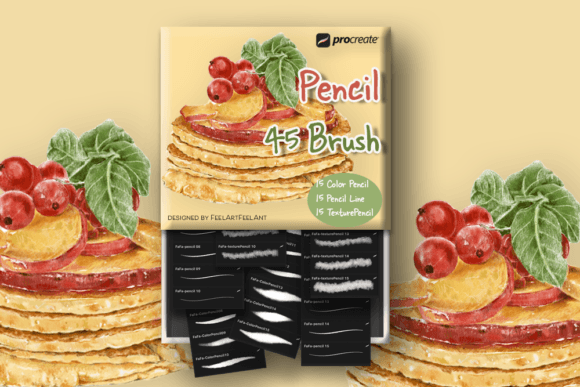
This isn't just another generic set of digital tools. It's a focused collection built for artists who value nuance and character in their linework. The pack is thoughtfully divided into three distinct categories to cover your entire sketching workflow: 15 Color Pencil brushes that mimic the rich, waxy laydown of colored pencils, 15 Pencil Line brushes for everything from fine, precise detailing to broad, expressive shading, and 15 Texture Pencil brushes that add gritty, grainy, and textured effects perfect for adding depth and realism. Together, they create a versatile system that feels intuitive and responsive under the Apple Pencil.
More Than Just Tools: Capturing a Style and Personality
The visual character of these brushes is where they truly shine. They are engineered to avoid that overly smooth, "digital" look. Instead, you get a beautiful, organic grain that interacts with your canvas texture. The Color Pencil brushes don't just lay down flat color; they build up with a slight texture and can be layered for rich, vibrant effects reminiscent of traditional colored pencil illustrations. The Pencil Line brushes offer a range of hardnesses, from a hard, precise HB for technical sketching and logo design concepts to a soft, dark 6B for expressive shading and hand lettering exploration.
The Texture Pencil variants are game-changers for adding atmosphere. They can create effects that mimic charcoal dust, gritty graphite, or even a cross-hatching style with a single stroke. This inherent personality makes them ideal for projects that need a human, handmade feel. Think of indie book editorial design, where chapter headers or marginalia need a personal touch. Or consider social media graphics for a boutique brand, where authenticity and craft are part of the core message. These brushes help you build a brand identity that feels approachable and artisanal, not mass-produced.
Practical Applications: Where These Brushes Excel
Understanding where a design asset works best is key to using it effectively. The 45 Pencil Brushes for Procreate are versatile, but they have specific strengths that can elevate certain projects.
- Concept Art & Illustration: The natural flow is perfect for character design, environment sketching, and storyboarding. The texture adds instant depth to rough concepts.
- Hand Lettering & Typography: Create custom script font lettering or handwritten font styles with genuine character. The line brushes respond to pressure and tilt just like a real pencil, giving you control over thick and thin strokes.
- Logo Design & Branding: Develop initial sketches and refined marks with an organic quality. This is especially effective for brands in the wellness, artisanal food, or creative education spaces.
- Packaging Design: Add illustrative elements, borders, or texture overlays that give product packaging a tactile, premium feel, even in a digital mockup.
- Digital Note-Taking & Journaling: Transform your iPad notes into beautiful, engaging documents. The color pencils are fantastic for color-coding and highlighting ideas.
It's crucial to remember the technical requirement: these are Procreate sketching brushes. They require Procreate 5.0.8 or 5X, an iPad, and an Apple Pencil. They are optimized for this ecosystem and do not function in Photoshop or other applications. This focus ensures they are perfectly tuned for the pressure sensitivity and tilt functions of the Apple Pencil, delivering the responsive feel that makes digital sketching so rewarding.
Integrating into Your Workflow: A Practical Guide
Adding a new Procreate brush pack to your toolkit is exciting, but a little strategy goes a long way. Here’s how to get the most out of this collection.
Evaluate the Fit: Before diving in, consider your project's needs. Is the goal a clean, vector-like logo? These brushes might be too textured. Is it a heartfelt children's book illustration? Perfect. They are a creative font alternative, but for your sketching and drawing phase.
Test and Pair: Spend time with each brush category on a test canvas. Experiment with the pressure curves in Procreate’s settings to match your personal touch. Don’t use them in isolation. Think about font pairing in a broader sense. A detailed pencil sketch pairs beautifully with a clean, modern sans serif font for final text, or a classic serif font for a more traditional feel. Let the pencil art be the star, and choose complementary typography.
Review the Styles: With 45 options, it’s easy to feel overwhelmed. Start by selecting 3-5 core brushes—one from each category—that you’ll use most often. Master those first. A soft pencil for sketching, a hard pencil for detailing, and a texture brush for shading is a powerful starting trio.
Readability & Hierarchy: In illustration, readability comes from clarity of form and value. Use the softer, darker brushes for foreground elements and key details. Use lighter, textured brushes for background atmosphere or secondary elements. This naturally creates visual hierarchy without needing to think in typographic terms.
Commercial Licensing: The licensing is generous and clear. You are authorized to use these brushes to create unlimited products—both digital and physical—for personal and commercial use. This means you can sell prints, stickers, digital art files, or incorporate the illustrations into client work. The key restriction is straightforward: you cannot resell, share, or redistribute the brush files themselves. You cannot claim the brushes as your own copyrighted work. They are a tool for your creation, not a product for resale.
Ultimately, the 45 Pencil Brushes for Procreate are more than just design assets; they are a conduit for expression. They provide the means to infuse your digital work with the warmth, imperfection, and unmistakable character of traditional pencil art. For the designer, marketer, or hobbyist seeking to create work that feels authentic and engaging, this Procreate brush pack offers a direct path to achieving that goal. All you need is your iPad, your Apple Pencil, and a willingness to explore the beautiful grain of a digital pencil line.