Mastering Procreate Script Brushes for Authentic Lettering
When you move beyond standard digital fonts and enter the realm of hand-lettering, the texture of your work changes entirely. Procreate Script Brushes offer a bridge between the precision of vector graphics and the organic feel of ink on paper. This specific collection is designed to replicate the nuance of traditional tools, giving your iPad artwork a tangible, handmade quality that standard vector brushes often lack. It is not just about writing words; it is about crafting an experience for the viewer.
Anatomy of the Set: Understanding Your Tools
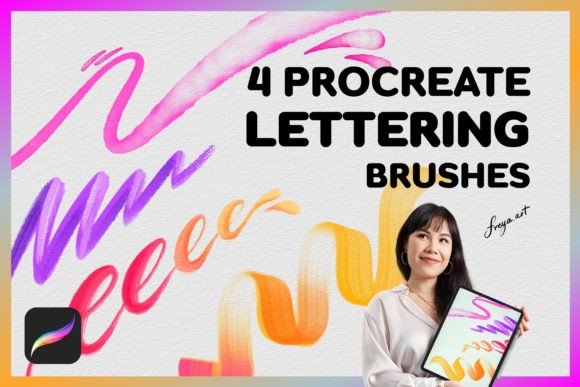
To get the most out of this collection, you need to understand what each tool is designed to do. The set includes four distinct brushes and a bonus texture, each serving a specific purpose in the lettering workflow.
- Round Multi Line Brush: This is your workhorse for adding flair. It creates multiple parallel lines with a single stroke, instantly adding depth and complexity to your lettering without requiring you to manually draw each strand.
- Round Outline Brush: Essential for creating definition. Whether you are outlining a bold headline or creating a sticker effect, this brush provides a clean, consistent border that helps your text pop against complex backgrounds.
- Shadow Brush: Depth is crucial in digital art. This brush allows you to add realistic shadows to your letters, grounding them on the canvas and giving the composition a three-dimensional feel.
- Duo Color Brush: This is where the creative fun begins. It loads two colors into a single stroke, creating a dynamic, multicolor effect that mimics the look of a dirty brush or a split-nib pen.
- Bonus Paper Texture: Digital perfection can sometimes feel sterile. This texture overlay adds the grain and tooth of real paper, making your final piece look like it was scanned rather than drawn on a screen.
Practical Applications: From Branding to Publishing
The versatility of Procreate Script Brushes extends far beyond simple journaling. For designers and entrepreneurs, these tools are assets for building a distinct visual identity.
Logo Design and Brand Identity
A logo needs to be memorable. If you are working on a brand identity for a boutique, a coffee shop, or a lifestyle blogger, a custom script wordmark can convey warmth and personality that a standard sans serif font cannot. You can sketch directly in Procreate using these brushes, ensuring the final logo has a human touch. The Duo Color Brush is particularly effective here for creating unique color variations that stand out in a crowded market.
Packaging and Editorial Design
In packaging design, texture sells. The tactile quality of the Round Multi Line Brush can make a product label look hand-crafted and premium. Similarly, in editorial design, such as magazine headers or chapter openers, using these brushes adds a layer of sophistication. It breaks the monotony of digital typesetting and draws the reader's eye to key headlines.
Digital Marketing and Social Media
Content creators and marketers know that social media graphics need to stop the scroll. Generic templates often blend together. By using Procreate Script Brushes to create custom headers for Instagram stories, Pinterest pins, or YouTube thumbnails, you create consistency across your channels. The handwritten style fosters a sense of intimacy and approachability, which is vital for community building.
Technical Considerations and Workflow
While the aesthetic appeal is strong, the technical application is just as important. These brushes are optimized for the Procreate app on the iPad. It is important to note that they will not function in desktop software like Adobe Photoshop or Illustrator. To achieve the best results, an Apple Pencil is highly recommended. The brushes are pressure-sensitive; a light touch yields a thin, delicate line, while pressing harder creates bold, heavy strokes. This sensitivity is what allows for authentic script font creation, mimicking the bounce and flow of traditional calligraphy.
When starting a project, consider your canvas resolution. High-resolution canvases will capture the subtle textures of the Shadow Brush and the paper texture better than low-resolution ones. This is especially critical if the final output is intended for print, such as wedding invitations or posters.
Design Strategy: Pairing and Hierarchy
Good design relies on contrast. When using Procreate Script Brushes for headlines, pair them with a clean, legible sans serif font for body copy. A handwritten style can be difficult to read in long paragraphs, so it is best reserved for display purposes—logos, headers, and pull quotes.
Visual hierarchy is established through size and weight. Use the Round Outline Brush for sub-headers to differentiate them from the main title created with the Multi Line Brush. This creates a clear path for the viewer’s eye, guiding them through the content logically. Think of these brushes not just as drawing tools, but as typographic instruments that dictate the rhythm of your layout.
Final Thoughts on Creative Assets
Investing in high-quality design assets like this brush set saves time and elevates the final product. Instead of struggling to create custom brushes from scratch, you have a curated toolkit ready to go. Whether you are a hobbyist creating art for your home or a professional designer working on a commercial project, Procreate Script Brushes provide the flexibility and quality needed to produce work that feels authentic and polished. They bridge the gap between the digital canvas and the artist's hand, resulting in work that resonates with audiences looking for genuine connection.