Mastering Procreate Chain Brushes for Digital Design
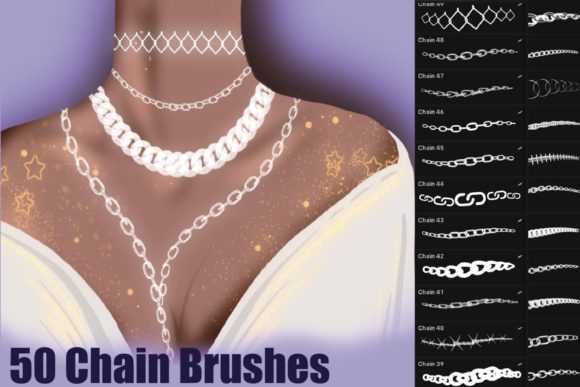
If you are working within the iPad ecosystem, you likely understand the immense value of specialized tools that streamline your workflow. When it comes to adding intricate details to digital illustrations or graphic design projects, Procreate Chain Brushes offer a distinct solution that bridges the gap between technical precision and creative expression. These assets are designed specifically for the Procreate app, utilizing the Apple Pencil to create seamless, repeating patterns of interlocking links. Unlike standard drawing brushes, these stamps allow you to create perfect geometric consistency without the tedious manual labor of drawing every single link by hand.
The core appeal of these brushes lies in their ability to simulate the physical weight and texture of metal or delicate jewelry. When you apply pressure with your Apple Pencil, the brush responds, allowing for variations in opacity and flow that mimic real-world materials. This functionality is critical for artists looking to add depth to their work. Whether you are illustrating a fantasy character needing armor or a fashion designer sketching a handbag, the Procreate Chain Brushes provide a texture that feels authentic. The "Clean" versions included in these sets are particularly useful for minimalist or modern designs where you need a crisp, unblemished outline without grunge or noise.
Practical Applications for Branding and Marketing
For small business owners and marketers, visual consistency is the bedrock of a strong brand identity. While typography often focuses on serif or sans serif choices, decorative elements play a significant role in how a brand is perceived. Incorporating chain motifs into your logo design or social media graphics can evoke feelings of connection, luxury, or industrial strength, depending on the execution. For example, a jewelry brand can use these brushes to create mockups for their Instagram feed, ensuring that every post looks cohesive and professionally rendered.
Consider the impact on packaging design. If you are creating a label for a high-end product, using a subtle chain border can elevate the perceived value of the item. The visual weight of a chain suggests durability and importance. Furthermore, these brushes are excellent for creating digital assets for editorial design. Imagine a magazine layout discussing the links between modern culture and technology; using a digital chain as a graphic divider or a background texture adds a layer of thematic depth that standard geometric shapes cannot achieve.
Enhancing Visual Hierarchy and Readability
One of the challenges in design is managing visual hierarchy. You need the viewer's eye to move naturally across the page. Procreate Chain Brushes serve as excellent directional tools. By using a chain to underline a headline or frame a call-to-action button, you guide the reader's attention exactly where it needs to go. This technique is particularly effective in web design mockups or digital brochures where you want to separate sections without using harsh lines.
However, readability must always remain a priority. These brushes are best used as decorative elements rather than for body text. Because they are intricate, using them for large blocks of text would make the content illegible. Instead, treat them as display elements. If you are designing a poster, use a bold sans serif font for the main message and surround it with chain illustrations to create a frame. This contrast between the clean typography and the textured brushwork creates a dynamic visual hierarchy that captures attention without overwhelming the viewer.
Technical Workflow and Usability
The usability of design assets is just as important as their aesthetic appeal. The Procreate Chain Brushes are delivered as an instant download in a .brushset format, which integrates seamlessly into the Procreate app. The installation process is straightforward: after downloading the file, you simply open Procreate, create a new canvas, and use the "Import" function to add the brushes to your library. This ease of use means you can spend less time configuring your tools and more time actually creating.
Because these are digital stamps, they offer a level of consistency that is difficult to achieve with freehand drawing. When working on a long project, such as a graphic novel or a series of educational materials, maintaining the same line weight and link size is crucial for professionalism. These brushes ensure that a chain drawn on page one looks identical to one drawn on page fifty. This consistency reinforces the quality of your work, signaling to your audience that you pay attention to the details.
Choosing the Right Style for Your Project
When deciding how to use these assets, consider the personality of your project. The "Clean" brushes are ideal for modern typography pairings and web design elements where sharp edges and clear lines are required. They work well in corporate presentations or tech-focused branding. On the other hand, if you are working on a vintage poster or a rustic-themed invitation, you might opt for brushes that have more texture or weight.
Font pairing is also a consideration when integrating these brush strokes. A heavy, industrial chain pairs well with a bold, geometric sans serif typeface, creating a powerful, masculine aesthetic. Conversely, a finer, more delicate chain script works beautifully alongside a flowing script font or a classic serif, suitable for wedding invitations or luxury branding. Always test your brush strokes against your chosen typeface to ensure they complement rather than compete with one another.
Conclusion
Ultimately, Procreate Chain Brushes are more than just a novelty; they are a practical design asset for a wide range of creative professionals. From illustrators looking to save time on complex textures to marketers aiming to add a unique flair to their campaigns, these brushes offer versatility and precision. By understanding how to leverage their visual characteristics and technical capabilities, you can enhance your workflow and produce work that stands out in a crowded digital landscape.