Hand Drawn Arrows Brush: Your Guide to Authentic Visual Direction
In a digital landscape saturated with clean lines and sterile interfaces, the human touch has become a powerful differentiator. This is where the Hand Drawn Arrows Brush collection finds its niche. It is not merely a set of graphical markers; it is a toolkit designed to inject personality, spontaneity, and organic warmth into your projects. Whether you are a designer crafting a brand identity, a marketer creating social media assets, or a hobbyist making personalized invitations, these brushes and vectors offer a versatile way to guide the eye without the rigidity of standard vector shapes.
The Anatomy of the Collection
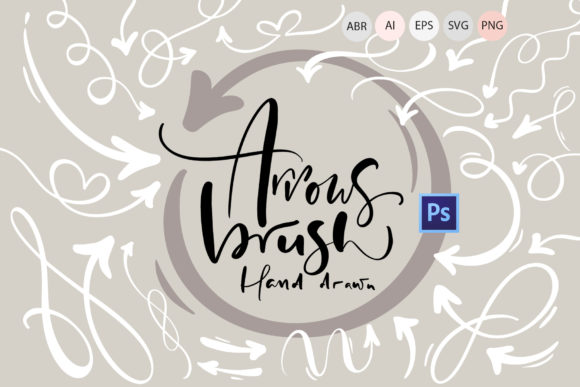
At its core, this download is a hybrid resource. You get 63 Photoshop hand drawn arrow brushes in an .abr file, which allows you to stamp or paint arrows directly onto your canvas with varying pressure and texture. However, the utility extends far beyond Photoshop. The package includes 63 vector hand drawn arrows in AI, EPS, and SVG formats, ensuring they are fully scalable and editable. For those working in print-heavy environments or needing specific raster assets, there are also 63 high-resolution transparent PNGs (4000 x 4000, 300 DPI).
The visual style is distinctly "imperfect." Unlike the geometric precision of sans serif icon sets, these arrows feature slight wobbles, varied line weights, and textured edges. They mimic the look of a quick sketch on a whiteboard or a note jotted in the margins of a notebook. This aesthetic is crucial for brand identity projects that aim to feel approachable and human rather than corporate and distant.
Practical Integration: From Screen to Print
One of the strongest aspects of this collection is its adaptability across different media. Because each object is on its own separate layer, you have complete freedom to manipulate size, position, color, and rotation. This is essential for maintaining consistency in a multi-channel campaign.
Consider the versatility for packaging design. A hand-drawn arrow can point to an ingredient list or a discount code on a physical box, adding a whimsical, artisanal feel that suggests care and craftsmanship. Similarly, in editorial design, such as magazines or newsletters, these arrows can break up text-heavy layouts, acting as visual connectors to guide the reader from a headline to a subheading or a pull quote. They serve as excellent design assets for creating visual hierarchy without relying solely on font size or weight.
For digital applications, the PNG files are perfect for quick implementation in web design or social media graphics. If you are building a dashboard in a tool like Canva or PowerPoint, a simple arrow can highlight key metrics. However, for true creative control, using the vector files in Adobe Illustrator or Inkscape is recommended. This allows you to edit the vector paths, ensuring the arrow fits perfectly into a complex logo design or a custom illustration.
Enhancing Readability and Engagement
Typography and illustration work hand in hand to create visual hierarchy. While a serif font conveys tradition and authority, and a sans serif font offers modern clarity, a hand drawn arrow acts as a directional cue that feels personal. It mimics the natural human tendency to point things out.
When used in web design, these arrows can significantly improve user experience. A curved arrow pointing toward a "Sign Up" button or a "Read More" link draws the user's attention naturally, often more effectively than a standard geometric icon. In greeting cards or invitation designs, the arrows add a layer of intimacy, suggesting that the message was crafted specifically for the recipient. This subtle psychological impact can increase engagement and make your content feel more curated.
Technical Workflow and Ease of Use
Despite the professional quality of the files, the integration process is straightforward. For Adobe Photoshop users, the workflow is seamless:
- Open Adobe Photoshop.
- Navigate to Window > Brushes.
- In the brush tab, click the menu icon (four horizontal lines) and select "Import Brushes."
- Locate and open the "63 Arrow Brushes.abr" file.
- The brushes are now ready to use on any canvas.
For vector work, the AI, EPS, and SVG files ensure that your graphics remain crisp at any size. This is particularly important for print on demand services, such as printing on mugs, pillows, or posters, where resolution is paramount. The high-resolution PNGs (300 DPI) ensure that even if you choose to use rasterized versions, the quality remains professional.
Strategic Application for Brand and Business
For entrepreneurs and small business owners, these assets offer a cost-effective way to elevate your marketing materials. Instead of commissioning custom illustrations for every social media post or blog graphic, you can utilize this library to maintain a consistent, hand-crafted aesthetic.
When evaluating font pairings with these arrows, consider the contrast. Pairing a rough, hand-drawn arrow with a clean, modern typography style (like a geometric sans serif) creates a dynamic tension that is visually interesting. Conversely, pairing them with a script font or a handwritten font creates a cohesive, "scrappy" look ideal for lifestyle brands or artisanal products.
Ultimately, the Hand Drawn Arrows Brush