Bring the Forest to Your iPad: A Deep Dive into the 350 Brush Collection
There’s a particular challenge in digital art that many creators face: making nature feel alive. A generic leaf stamp or a uniform block of green can flatten a landscape, stripping away the organic chaos that makes a forest scene truly immersive. For artists using Procreate, the search for brushes that capture this authenticity often leads to collections that promise much but deliver little more than basic shapes. The 350 Forest Leaves Grass Procreate Brushes set aims to bridge that gap, offering a toolkit that translates the intricate beauty of the natural world into a digital format that feels both intuitive and expansive.
Anatomy of a Natural Toolkit
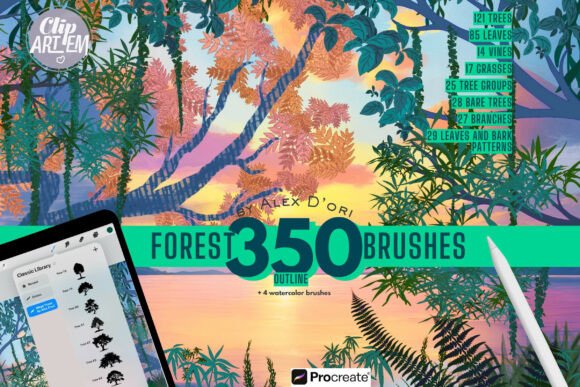
This isn't just a collection of random stamps. The set is engineered to replicate the specific visual characteristics of a forest ecosystem. The 121 tree brushes, for example, aren't all the same. You’ll find distinct variations—from the dense, layered needles of tall pines to the broad, textured canopy of blooming oaks. This specificity is crucial for creating depth. A background forest shouldn’t look like a scaled-down version of the foreground; it requires different levels of detail and texture, which these brushes provide through their semi-transparent layering capabilities.
The true power lies in the interplay between elements. The 85 leaf brushes come in three distinct styles: realistic, outline, and artistic. The realistic versions capture the veins and slight imperfections of a real leaf, perfect for botanical illustrations or detailed foreground elements. The outline brushes are ideal for creating pattern work or a more illustrative, graphic style. Meanwhile, the artistic brushes offer a more expressive, painterly feel, which can add movement and emotion to a piece. When combined with the 14 vine brushes and 17 grass brushes, you can construct a ground layer that has genuine texture—fine blades of grass catching the light, with vines weaving through, creating a sense of untamed growth.
Beyond the Canvas: Practical Applications
While the immediate application is landscape illustration, the versatility of the 350 Forest Leaves Grass Procreate Brushes extends into numerous professional and personal projects. For designers working on brand identity, these brushes offer a unique way to create organic textures and patterns. Imagine a logo for an eco-friendly brand that incorporates a subtle leaf pattern as a background texture, or packaging design for a herbal tea that uses a custom forest scene. The brushes move beyond simple illustration into the realm of design assets, providing elements that can be isolated, recolored, and integrated into broader visual systems.
In the publishing world, the value is clear. Children’s book illustrators can build entire worlds with consistent, high-quality textures. Concept artists for fantasy games or films can rapidly generate moody silhouettes using the 28 bare tree brushes to establish a scene's atmosphere. For social media managers and content creators, the set is a shortcut to creating engaging, professional-looking graphics. A blog post about mindfulness could be paired with a custom header image featuring a serene forest scene, built in minutes rather than hours. The brushes are a practical solution for anyone needing to add a layer of natural sophistication to their digital presence.
Making the Tool Work for You
Adopting a new brush set is about more than just downloading files; it’s about understanding how to integrate it into your workflow. First, consider the project's tone. The 25 tree group brushes are perfect for quickly establishing a dense, layered forest background, while the 27 branch brushes are your go-to for adding intricate detail to a single tree in the foreground. The 29 leaves and bark pattern brushes function as excellent texture stamps, allowing you to add richness to surfaces without manually painting every detail.
A key feature is the inclusion of outline and full-color versions for many brushes. This gives you control over your visual hierarchy. You might use the outline versions to sketch your composition, then switch to full-color with varying opacity to build up the scene. The four watercolor brushes and two color blenders are particularly useful for creating soft, atmospheric effects—think morning mist or dappled sunlight filtering through a canopy. They allow for smooth transitions that prevent the digital art from looking too harsh or artificial.
Finally, think about font pairing in a broader sense. If you’re creating a poster or a social media graphic with text, the style of your nature scene should complement your typography. A bold, modern sans-serif font can create a striking contrast against a detailed, realistic forest background, making the text pop. Alternatively, a delicate script font can harmonize with a more painterly, artistic leaf style for a softer, more whimsical feel. The brushes are a creative font in their own right—a visual language that sets the mood. By understanding their personality, you can ensure they enhance, rather than compete with, your other design elements, leading to a more cohesive and professional final product.