Design Trendy Planner Stickers Instantly in Procreate
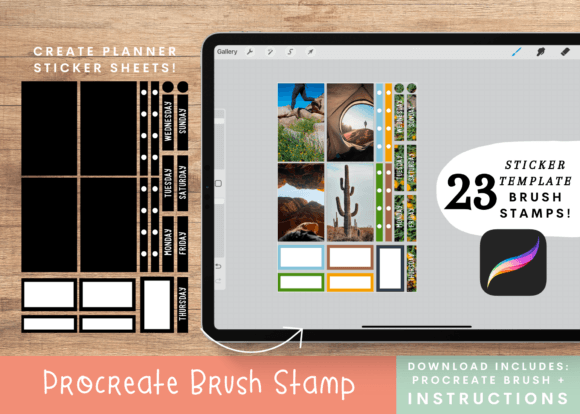
If you have ever wanted to monetize your digital planning hobby or create custom inventory for your Etsy shop, the barrier to entry just got significantly lower. Moving away from traditional typography, the Planner Sticker Procreate Brush set offers a specialized, practical workflow for graphic designers and stationery entrepreneurs. Instead of spending hours manually drawing cut lines or fiddling with complex vector paths, this collection of 23 abstract template stamp brushes streamlines the entire production process. It is designed specifically for the iPad artist who values efficiency without sacrificing the bespoke, hand-crafted aesthetic that modern consumers love.
Streamlining Your Workflow with Template Stamps
The core appeal of this toolkit lies in its specific application of Procreate’s native features. This is not just a random collection of doodles; it is a premium font and design asset hybrid built for production. The set includes 23 abstract brush stamps designed to function as the skeletal structure of your stickers. The visual style is trendy and geometric, fitting perfectly into the modern graphic design landscape where clean lines meet abstract shapes.
The personality of these stickers is versatile. Depending on the patterns and colors you apply, they can range from minimalist and professional to vibrant and playful. This flexibility is crucial for anyone involved in brand identity work or social media graphics. You aren't just buying shapes; you are buying a framework for modern typography and illustration layouts that can be adapted to fit any aesthetic, whether it is for a corporate planner or a creative journal.
Technical Setup and The Clipping Mask Method
Understanding the technical workflow is key to getting the most out of the Planner Sticker Procreate Brush set. The process leverages the clipping mask feature, a staple in digital illustration that allows you to confine textures and patterns to specific areas. The included instructions are straightforward, guiding you through a simple layering system.
- Canvas Preparation: Set your canvas to 4.5 x 6.75 inches. This is a standard size that scales well for print-on-demand services or direct printing.
- Creating the Base: Turn off the background color and add a second layer. Stamp your chosen template brush in white. This white base is essential for opacity and color vibrancy later on. Fill in any gaps using the color fill tool or a standard brush.
- Adding Definition: Add a new layer and stamp the same brush in black. This creates the "cut line" or the bold outline characteristic of printable stickers.
- Pattern Application: This is where the design comes to life. Add another layer above the color layer and use the clipping mask feature. You can now paint textures, gradients, or script font overlays inside the sticker shape without worrying about going outside the lines.
This method ensures that your stickers have a professional finish, distinguishing them from amateur designs. It allows for rapid iteration; you can change the pattern inside a sticker with a single swipe, instantly generating new product variations for your shop.
Practical Applications for Entrepreneurs and Creatives
The utility of the Planner Sticker Procreate Brush extends far beyond simple journaling. For small business owners, this tool is a gateway to creating tangible products. The commercial use license included with the set is a significant advantage, allowing you to sell the stickers you create without legal hurdles.
Consider the following real-world applications:
- Etsy and Craft Sellers: Create sticker sheets to sell as digital downloads or physical products. The abstract style appeals to a broad audience, from students to professionals.
- Event Planners and Marketers: Design custom seals for envelopes, packaging labels for product launches, or branded stickers for conference swag bags.
- Content Creators: Use the stickers as visual elements in packaging design mockups or as interactive elements in digital planners sold on platforms like Gumroad.
- Cricut and Silhouette Users: The high-contrast black and white design process makes these stickers incredibly easy to trace in cutting machine software. The clean lines ensure accurate cuts every time.
Unlike a standard display font or sans serif font, which conveys information through text, these stickers communicate through shape and texture. They serve as visual anchors in editorial design or can be used to break up text-heavy layouts in web design assets.
Evaluating Fit and Design Consistency
When integrating these assets into your creative toolkit, think about how they complement your existing design assets. Because the set focuses on abstract shapes, it pairs exceptionally well with bold typography. If you are designing a logo or a header, using a thick serif font alongside these geometric stickers can create a strong visual hierarchy.
However, readability is always a priority. While you can layer text over these stickers, ensure there is enough contrast. The beauty of the Procreate workflow is the ability to test this instantly. You can adjust the opacity of the sticker background or change the color of the text layer to ensure your message is clear.
For those worried about the stickers looking too "digital," the texture comes from you. By using the clipping mask technique, you can apply watercolor washes, gritty noise, or paper textures to the inside of the stamp. This gives the final product a tactile feel, bridging the gap between digital design and physical stationery. Whether you are a hobbyist looking to organize your life or a professional expanding your product line, this brush set provides a practical, stylish, and profitable solution.