Bring Your Creatures to Life with Procreate Animal Textures
In digital illustration, texture is often the bridge between a flat concept and a tactile reality. While many artists focus on line work and color palettes, the surface quality of a subject is what gives it weight and personality. This is particularly true when illustrating animals. The sleek sheen of a dolphin, the rough scales of a dragon, or the soft fluff of a rabbit are defining characteristics that require specific tools to replicate effectively. Standard brushes often lack the nuance needed for these organic surfaces, leaving illustrations looking generic or overly smooth. This is where specialized tools become invaluable for designers and illustrators looking to elevate their craft.
Understanding the Power of Organic Texture
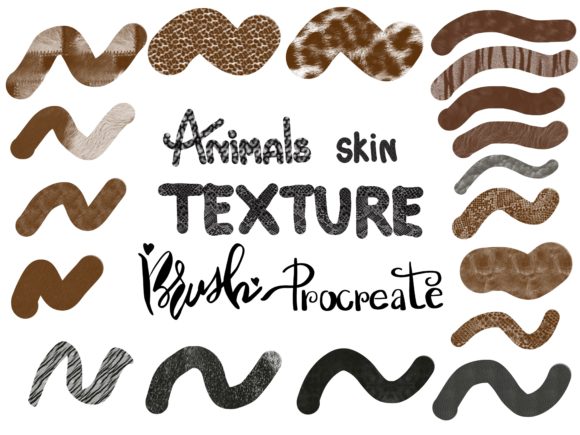
The Infinity Art Works collection, featuring 36 Animals Skin Texture Brushes for Procreate, addresses this gap by offering a dedicated toolkit for organic surfaces. Unlike standard brushes that might simply scatter dots, these brushes are engineered to mimic the actual structure of animal skins. They offer a variety of finishes, ranging from coarse reptilian scales to soft mammalian fur, allowing for a level of realism that standard tools cannot match. The collection is designed specifically for the iPad Pro environment, utilizing the pressure sensitivity of the Apple Pencil to ensure that strokes feel natural and responsive.
For the creative professional, the value of a tool like this extends beyond simple realism. In modern typography and illustration, texture adds depth and interest. It breaks up flat areas of color and guides the viewer's eye. When working on brand identity projects, such as a logo for a pet care service or a wildlife conservation group, using these brushes can create a creative font or visual language that feels authentic and grounded. It moves the design away from sterile vector graphics toward something that feels handcrafted and organic.
Practical Applications for Designers and Creators
When considering how to integrate the Animals Skin Texture Brushes into your workflow, think about the specific needs of your project. These brushes serve as powerful design assets for a wide range of applications.
- Children’s Book Illustration: For authors and publishers, consistent character texture is vital. These brushes allow you to maintain the same fur pattern or scale texture across multiple pages, ensuring consistency and professionalism throughout the narrative.
- Surface Pattern Design: If you are designing fabrics or stationery, animal prints are timeless. Using these brushes allows you to create unique, hand-drawn patterns that stand out from the digitally generated prints found on stock sites.
- Social Media Graphics: For marketers and content creators, eye-catching visuals are essential for engagement. Adding a textured animal element to a post about "wild" sales or "natural" ingredients can significantly boost audience engagement and recognition.
- Packaging Design: For products targeting eco-conscious consumers, organic textures suggest natural origins. A rough, textured background can influence brand perception, making a product feel more premium and authentic.
Integrating Texture into Your Visual Hierarchy
Using texture effectively requires a strategic approach to visual hierarchy. You do not want to apply heavy textures to every element, as this can overwhelm the viewer and reduce readability. Instead, use the Animals Skin Texture Brushes to highlight key areas. For example, if you are creating a poster, you might use a clean sans serif font for the body copy to ensure legibility, but apply a textured brush to the main illustration to create a focal point.
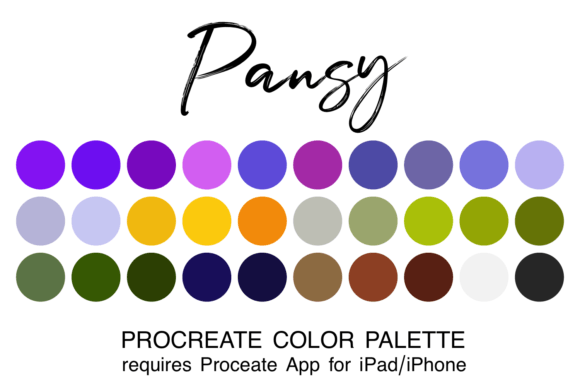
The collection includes a free procreate color palette with 60 colors. This is a crucial component for maintaining harmony. When working with complex textures, color choice matters immensely. Earth tones, muted greens, and deep browns often work best to complement the organic nature of the brushes. However, don't be afraid to experiment with non-natural colors for a more stylized, modern look. A neon green leopard print, for instance, can be very effective in streetwear design or urban branding.
Evaluating Fit and Functionality
Before diving into a final piece, it is wise to test the brushes. As an experienced designer, I recommend creating a "texture swatch" sheet. Import the brushes into Procreate and test each one with varying levels of pressure. Notice how the opacity changes and how the texture builds up. This helps you understand the "personality" of each brush. Some might be better for broad background fills, while others are perfect for fine detail work on fur strands or scale edges.
It is also important to consider font pairing when mixing text with textured illustration. If your illustration is highly detailed and textured, pairing it with a complex script font or a heavy display font might create visual clutter. Often, a simple serif font or a clean geometric sans serif font provides a necessary visual resting place for the eyes, allowing the texture of the artwork to shine without competing for attention.
The Technical Advantage of Specialized Brushes
One of the main challenges in digital art is avoiding the "digital" look. Standard brushes often leave uniform edges that scream "computer-generated." The Animals Skin Texture Brushes are designed to break up these edges. By utilizing the pressure sensitivity of the Apple Pencil, you can vary the density and opacity of the texture, creating a much more organic result. This is essential for editorial design where high-end aesthetics are expected, or for web design elements that need to feel unique and personal.
For entrepreneurs and small business owners, creating custom assets can be time-consuming. Purchasing a premium font or a high-quality brush set like this is an investment in efficiency. Instead of spending hours trying to paint scales manually, you can apply a realistic texture in minutes. This allows you to focus on the broader aspects of your brand identity and marketing strategy rather than getting bogged down in technical execution.
Commercial Licensing and Project Scope
When using assets like these for commercial work, it is vital to understand the licensing. The Infinity Art Works set is designed for commercial use, meaning you can incorporate these textures into products you sell, such as prints, merchandise, or client work. This makes them a versatile addition to any designer's toolkit. Whether you are a freelancer working on a client's packaging or a crafter selling digital downloads on Etsy, having access to commercial-grade design assets ensures you are operating professionally and legally.
Ultimately, the goal of any design tool is to help you communicate your vision more effectively. The Animals Skin Texture Brushes for Procreate offer a specific solution for a common creative challenge. They provide the means to add depth, realism, and character to digital illustrations. By understanding how to use them effectively—balancing texture with clean typography, utilizing the included color palette, and applying them to appropriate projects—you can significantly enhance the quality of your creative output. This collection is not just about drawing animals; it is about mastering the art of surface and texture in the digital age.